 Ask AI
Cloudinary Image & Video release notes: April 7, 2026
Last updated: Apr-7-2026
We publish Cloudinary Image and Video API release notes periodically to give you a quick overview of all the new features, enhancements, and fixes that we've recently released for Cloudinary developers. When relevant, they may also give sneak previews of upcoming features and/or other share important announcements.
SDKs and libraries
Start Using Cloudinary Skills for AI-assisted Cloudinary development
Cloudinary Skills help your AI agent follow best practices, suggest the right features for your use case, and reduce implementation errors. You can install them from the Cloudinary Skills pack using:
The current version of the Cloudinary Skills pack includes three skills, with more to come in the future.

You can also install the Cloudinary Skills pack from the Marketplace plugins for Claude and Cursor.
We welcome your feedback on the Cloudinary Skills pack. Please share your feedback via the GitHub repository.
Next.js SDK now fully supported by Cloudinary
The Next.js SDK is now officially supported and maintained by Cloudinary. Previously a community-developed project, the SDK now benefits from Cloudinary's in-house maintenance to ensure consistent updates, comprehensive support, and seamless integration with Cloudinary's latest features.
This transition means you can expect:
- Direct support from Cloudinary's engineering team
- Improved documentation and examples
- Faster bug fixes and feature implementations
The SDK continues to provide the same powerful components you rely on, with ongoing improvements to performance, developer experience, and feature coverage.
Cloudinary Video
Optimize & Resize in Video Player Studio
The Optimize section of the Video Player Studio has been renamed to Optimize & Resize and now lets you configure resize and crop, HDR video delivery, and responsive breakpoints directly from the UI. These settings apply to progressive delivery and are also available programmatically via the Video Player API.

You can now change the aspect ratio and resize behavior of your videos. Select from landscape (16:9), portrait (9:16), or square (1:1) aspect ratios, and select a resize mode: Smart Crop, Fill, or Pad with a custom background color.
The Studio also supports HDR video delivery and responsive breakpoints, described in detail below.
HDR video delivery in the Video Player
The Cloudinary Video Player can now automatically deliver HDR (High Dynamic Range) video to viewers whose devices and browsers support it, while falling back to a tone-mapped SDR version on unsupported devices.
When enabled, the player detects HDR-capable displays using the browser's (dynamic-range: high) media query and applies dr_high, vc_h265, and f_mp4 transformations to deliver H.265 HDR content. On non-HDR devices, the video is delivered as tone-mapped SDR, preventing washed-out colors.
Enable HDR delivery by setting the hdr parameter to true:
Video Player responsive breakpoints
The Cloudinary Video Player can now automatically select the optimal video resolution based on the player's container width and the viewer's device pixel ratio (DPR). This prevents delivering unnecessarily large video files to smaller screens, improving load times and reducing bandwidth.
Enable breakpoints with a single setting:
The player rounds the required width up to the nearest standard rendition (640, 848, 1280, 1920, 2560, or 3840 pixels) and applies a c_limit transformation. Use maxDpr to cap the DPR used for calculations (default: 2.0).
Video Config API
You can now programmatically retrieve and update per-video player configurations using the Video Config REST API. This API lets you manage the same player settings that the Video Player Studio saves through its UI, so you can automate player configuration workflows.
Example: Retrieve a video's player configuration
Example response:
For details on using the API, see Managing video settings via the API. For the full endpoint specification, see the Video Config API reference.
Asset and account management
Basic Auth for Upload API
The Upload API now supports Basic Authentication as an alternative to signature-based authentication. This simplifies integration for server-side uploads where you can securely store your API credentials.
With Basic Auth, you can authenticate using your API key and API secret in the request header:
Basic Auth is particularly useful for:
- Server-to-server uploads where credentials can be securely managed
- Simplifying authentication workflows without generating signatures
- Integrations that prefer standard HTTP Basic Authentication
For details, see Upload API authentication.
MCP remote servers: Streamable HTTP and observability headers
Cloudinary's remote Asset Management, Environment Config, and Structured Metadata MCP servers now use the Streamable HTTP endpoint (/mcp) by default.
The previous SSE endpoint (/sse) is deprecated for these servers and will be removed in a future version. The /sse endpoint also accepts POST requests as an alias for /mcp, so existing clients that send Streamable HTTP to /sse continue to work, but use /mcp for new configurations.
(The Analysis MCP server continues to use /sse.)
Additionally, when using API key authentication with remote MCP servers, you can now enable header embedding so each tool result includes an _headers field with API rate-limit information and request IDs.
Optional API key in Media Library widget
The api_key parameter is now optional when initializing the Media Library widget. When provided, the API key is validated to ensure it belongs to the specified cloud_name, adding an extra layer of security. When omitted, the widget authenticates solely through the user's Cloudinary login credentials.
This simplifies widget integration for use cases where API key validation is not required:
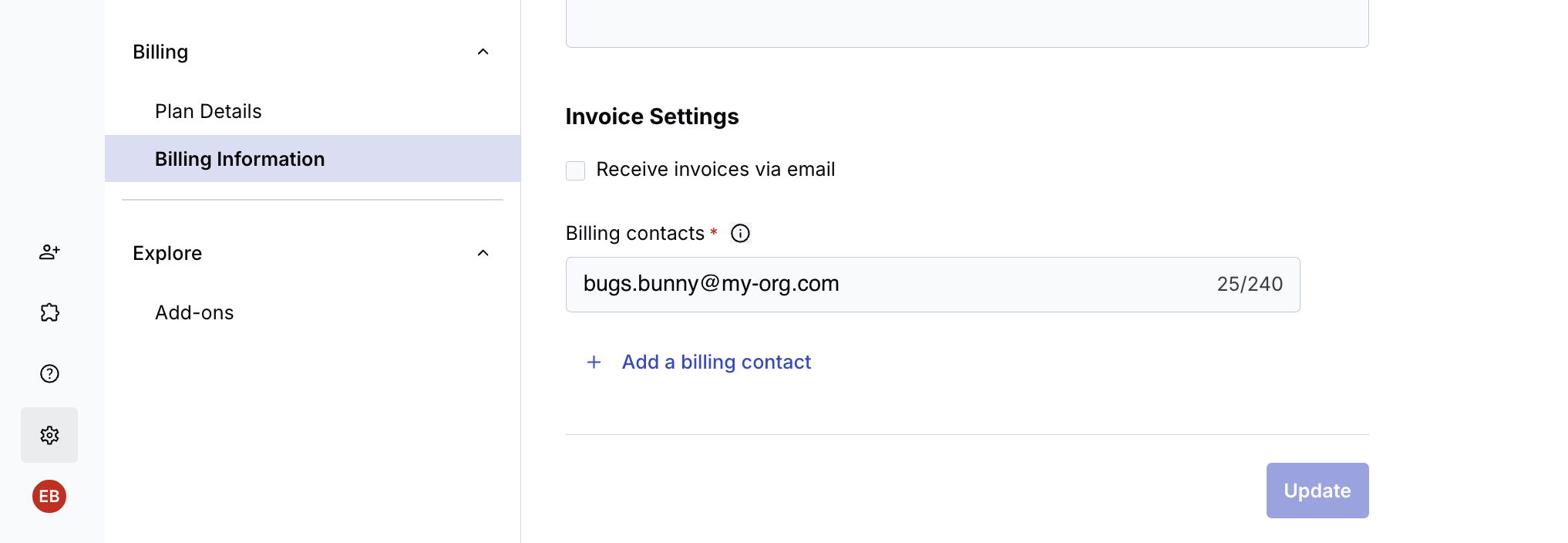
Opt in to receive billing documents via email
For customers who first upgraded from a free to a paying plan on or after March 26, 2026 and are using automated payments (Credit Card, Google Pay, or Apple Pay), billing documents, including invoices, receipts, and credit memos, aren't sent by email by default. All documents are available for download in the Console.
If you do want to receive monthly billing documents via email, you can opt in from the Billing Information page in the Console.
- If you pay by bank transfer, you'll always receive invoices via email, regardless of this setting.
- If you upgraded to a paid plan prior to March 26, 2026, you'll continue to receive monthly billing documents by email until you opt out, via the Billing Information page in the Console.
IP address masking for privacy compliance
Cloudinary offers IP address masking to help customers comply with privacy and data protection requirements. When enabled, this feature masks and encrypts source IP addresses for CDN delivery requests, actively deleting part of the addresses upon receipt (the last IPv4 octet and last 3 IPv6 octets are nullified), so that end user IP addresses aren't retained in Cloudinary's systems.
This optional feature ensures that IP addresses of end users are masked in all logs and databases, including CDN logs and headers. In cases where the full IP address is necessary for security purposes, the original IP address is kept encrypted but expires after one calendar day.
Announcements
Cloudinary Moderation is now generally available (GA)
Cloudinary Moderation, our AI-based product for keeping visual content on-brand, high-quality, and consistent at scale, has completed its Beta program and is now generally available.
Cloudinary Moderation uses AI tailored to your visual guidelines to validate assets for brand consistency, quality, and compliance. It functions like a dedicated brand reviewer, ensuring every asset meets your standards before it goes live. By automating what used to be a time-consuming manual task, it creates a scalable, reliable guardrail for teams handling high-volume content across marketing, marketplaces, and UGC flows.
Discontinuation of the Pixelz - Remove the Background add-on
Cloudinary is no longer accepting new customers for the Pixelz - Remove the Background add-on. For background removal, use the Cloudinary AI background removal transformation, which provides powerful AI-based background removal capabilities.
Register for notifications
Make sure you always know when we publish new release notes with the Image and Video release notes RSS feed:
 Grab this RSS link to watch for new Image and Video release notes in your favorite RSS reader.
Error
Rate this page:
