 Ask AI
Content provenance and authenticity (Beta)
Last updated: Oct-27-2026
Introduction
The Coalition for Content Provenance and Authenticity (C2PA) is a collaboration among tech and media companies to combat online misinformation. It aims to establish standards and tools for verifying the authenticity of digital media, such as images and videos, by capturing and preserving information about their creation and editing. The goal is to prevent the spread of deceptive or manipulated content on the internet.
C2PA defines a specification to accomplish this goal. The tooling used to implement C2PA is provided by the Content Authenticity Initiative (CAI), which consists of various SDKs, a command-line tool, and an underlying Rust library. See the GitHub repo.
C2PA uses cryptography to bind provenance metadata, called assertions, directly to the asset binary. Together, those assertions record who created or edited an asset, which tools were used, and whether AI was involved. The resulting manifest is tamper-evident: anyone can verify the signature, and any change to the asset breaks that signature unless the asset is signed again. A manifest can still be stripped from an asset entirely, so C2PA is best understood as a transparency mechanism for cooperative participants rather than a way to prevent misuse.
Cloudinary preserves, extends, and verifies C2PA manifests across the whole media lifecycle: on upload, through transformation and optimization, and at delivery.
You can use this online validation tool to see the history of certifications that have been applied to an image.
Cloudinary and the C2PA standard
Cloudinary has been an active participant in content authenticity standards work for several years:
- Cloudinary joined the Content Authenticity Initiative (CAI) in December 2020 and supports the adoption of open standards for media provenance and authenticity.
- Since 2023, Cloudinary has been included on the C2PA Interim Trust List (ITL) as an early supporting service, and is progressing through the official C2PA Conformance Program.
- Cloudinary is a member of ISO/JPEG and participates in the JPEG Trust work on ISO/IEC 21617, which sets standards for trustworthy media.
- Cloudinary holds U.S. Patent US 11,550,879 B2, "Providing Authenticity Mechanism for Media Content".
Scope
C2PA in Cloudinary is currently available only to customers who request it. To use the capabilities described on this page, contact our support team to have them enabled for your product environment.
It's implemented for images only (specifically, these output formats: avif, heic, heif, jpg, jpeg, png, svg, tif, tiff, and webp).
Cloudinary adds its signature in a new manifest on top of any existing manifests. If a previous signature is invalid, Cloudinary also marks the previous manifest as invalid.
Alterations made by Cloudinary are classified as transcoded or edited. The transcoded actions are defined by a closed allowlist and include: c_fit, c_mfit, c_pad, c_lpad, c_mpad, f_*, q_*, and c_scale with a single dimension, w or h.
All other actions are classified as edited.
The metadata attached to each asset contains the certificate, a private key, and a timestamp.
-
Video and other formats: support for
mp4andjxlis planned. - Backfilling existing assets: C2PA applies to assets you upload and deliver after the feature is enabled. There's no bulk process for adding manifests to assets already stored in your product environment.
- Remote manifests: manifests are currently embedded in the asset. As a manifest accumulates assertions over an asset's lifetime it grows, which adds to the delivered file size. Support for remote manifests, which keep the manifest separate from the asset so that day-to-day delivery stays light, is planned.
How Cloudinary adds C2PA manifests
Cloudinary adds C2PA manifests in two automatic cases and one on-demand case.
| Case | Trigger | What Cloudinary does |
|---|---|---|
| Preserve provenance | An uploaded asset already contains a valid C2PA manifest. | Cloudinary preserves the existing manifest and adds its own signed manifest on top of it, so the provenance chain carries forward to the derived asset on delivery. |
| Start the chain for generative AI | A transformation uses generative AI. See the full list. | Cloudinary injects a manifest marking the derived asset as AI-altered, starting a provenance chain even if the original had no manifest. |
| On-demand assertion | You add the c2pa flag (fl_c2pa) to a delivery URL. |
Cloudinary signs the derived asset and adds a manifest, whether or not the original contained one. Note: Cloudinary plans to deprecate this flag. |
Preserving an existing manifest
When an asset that already carries C2PA credentials is uploaded, Cloudinary preserves the existing manifest and carries it forward at delivery, so a chain that began in a camera or a creative tool isn't broken by transformation and optimization.
When Cloudinary delivers a derived asset, it doesn't replace or start over from the original manifest. It adds a new manifest, signed by Cloudinary, on top of the existing ones. That new manifest records Cloudinary's own actions, such as transcoding or editing, and the original manifest stays in the chain.
Starting a chain for generative AI transformations
Any transformation that uses generative AI produces an asset that has been materially altered by AI. For those transformations, Cloudinary dynamically injects a manifest recording that AI altered the asset. This means a derived asset carries a machine-readable record of the AI involvement without you needing to add anything to the URL.
The following transformations start a provenance chain:
-
Background removal (
e_background_removal) -
Content extraction (
e_extract) -
Drop shadow (
e_dropshadow) -
Generative background replace (
e_gen_background_replace) -
Generative fill (
b_gen_fillwithc_pad) -
Generative recolor (
e_gen_recolor) -
Generative remove (
e_gen_remove) -
Generative replace (
e_gen_replace)
Requesting a manifest on demand
c2pa flag.When delivering images that you want to be signed by Cloudinary, include the c2pa flag (fl_c2pa in URLs). For example:
The c2pa flag creates a manifest for assets that don't already have one. Assets that already carry a manifest get an updated manifest on transformed derived assets without the flag, for example when you resize an asset, even though no AI was involved. The examples below use fl_c2pa.
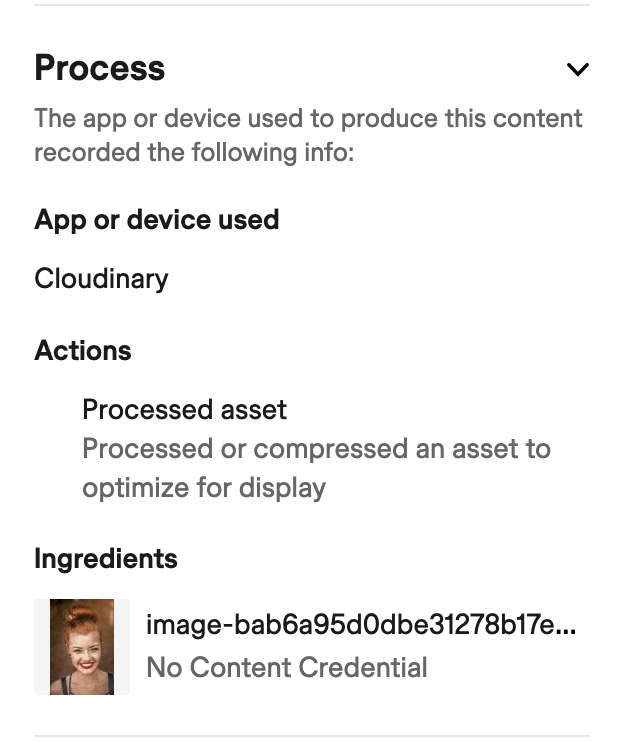
For images that are transcoded but not edited, for example c_scale,w_550/fl_c2pa, a validation tool would show something similar to the following (view in validation tool):

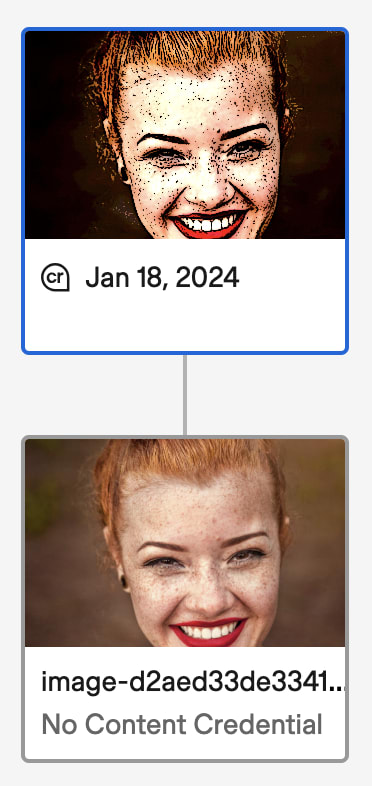
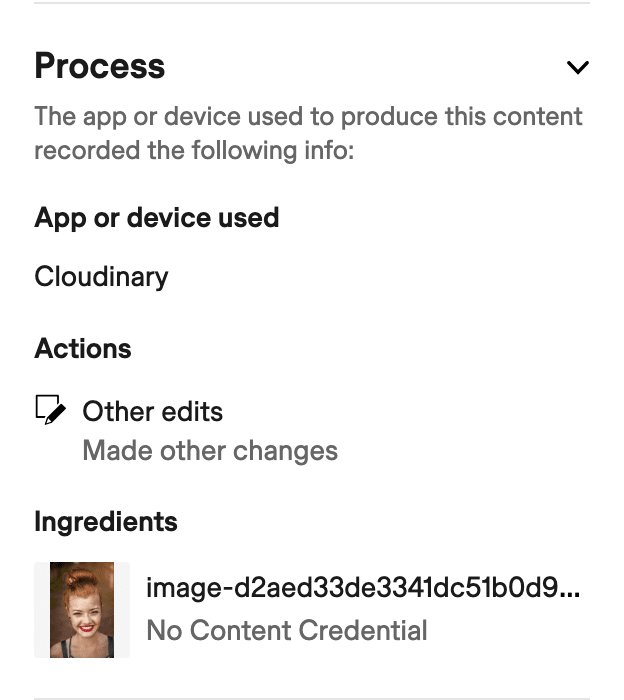
For images that are edited, whether or not they're also transcoded, for example e_cartoonify/fl_c2pa, a validation tool would show something similar to the following (view in validation tool):
Provenance and AI fields
Alongside the manifests themselves, Cloudinary tracks two asset properties: whether AI was involved, and whether the asset carries a manifest at all. A manifest on its own doesn't mean AI was used, so the two are independent. They also work differently from each other:
| Field | Values | Description |
|---|---|---|
| AI-generated |
true (or not set) |
Whether AI generated or altered the asset. The field is only ever true or absent: there's no false value, because an asset that isn't marked as AI-generated might still be AI-generated without Cloudinary knowing. It's stored as protected, virtual contextual metadata in a private block, separate from your own keys, so you can't overwrite it by accident. Because it's a context field, you can reference it in conditional transformations, which makes a visible AI disclosure possible. See how the field gets set. |
| Has C2PA |
true / false
|
Whether the asset carries a C2PA manifest. Cloudinary sets this itself, either by inspecting the uploaded file or by adding the manifest itself, so you never set it. It isn't contextual metadata, so you can't use it in a conditional transformation. |
Both fields are available as supported expression fields for the Search API and Media Library search.
Field names
The name you use depends on where you're using the field:
| Context | AI-generated | Has C2PA |
|---|---|---|
| Upload parameter | ai_generated |
Not applicable: set by Cloudinary |
| Search expression | ai_generated |
has_c2pa |
| Conditional transformation | cld_ai_generated |
Not applicable: not a context field |
The conditional transformation variable carries a cld_ prefix because it's read from contextual metadata, where it could otherwise clash with a contextual metadata key of the same name that you've defined yourself. The prefix keeps the two apart, so the result is never ambiguous.
How the AI-generated field gets set
The AI-generated field can be set in several ways:
-
By you, on upload: pass the
ai_generatedupload parameter in your upload call, directly or via an upload preset. - By Cloudinary, from an existing manifest: when an uploaded asset contains a C2PA manifest indicating AI generation, Cloudinary sets the field.
- By Cloudinary, on AI generation: when you generate an image with Cloudinary's generative AI transformations, Cloudinary sets the field on the result.
You can't update this field for existing assets.
Setting ai_generated on upload is useful for bulk imports from a generation pipeline, where you know the assets are AI-generated but the source files may carry no manifest. For example:
- The
ai_generatedupload parameter isn't supported in the Cloudinary SDKs yet. Use the Upload API directly, as shown in the example. - Because the AI-generated field is stored in a private block rather than in your own contextual metadata, it isn't shown or editable in the Media Library Metadata tab by default.
Finding assets by provenance
You can search for assets by provenance using the ai_generated and has_c2pa search expression parameters. Use the expression with the Search API, or enter it in the Media Library search box.
Find AI-generated assets
Use the following expression to find assets identified as AI-generated:

If your Media Library Preferences administrator sets AI-generated as the primary attribute, AI-generated assets are labeled as such in all Media Library views. This option requires an Assets Enterprise plan.
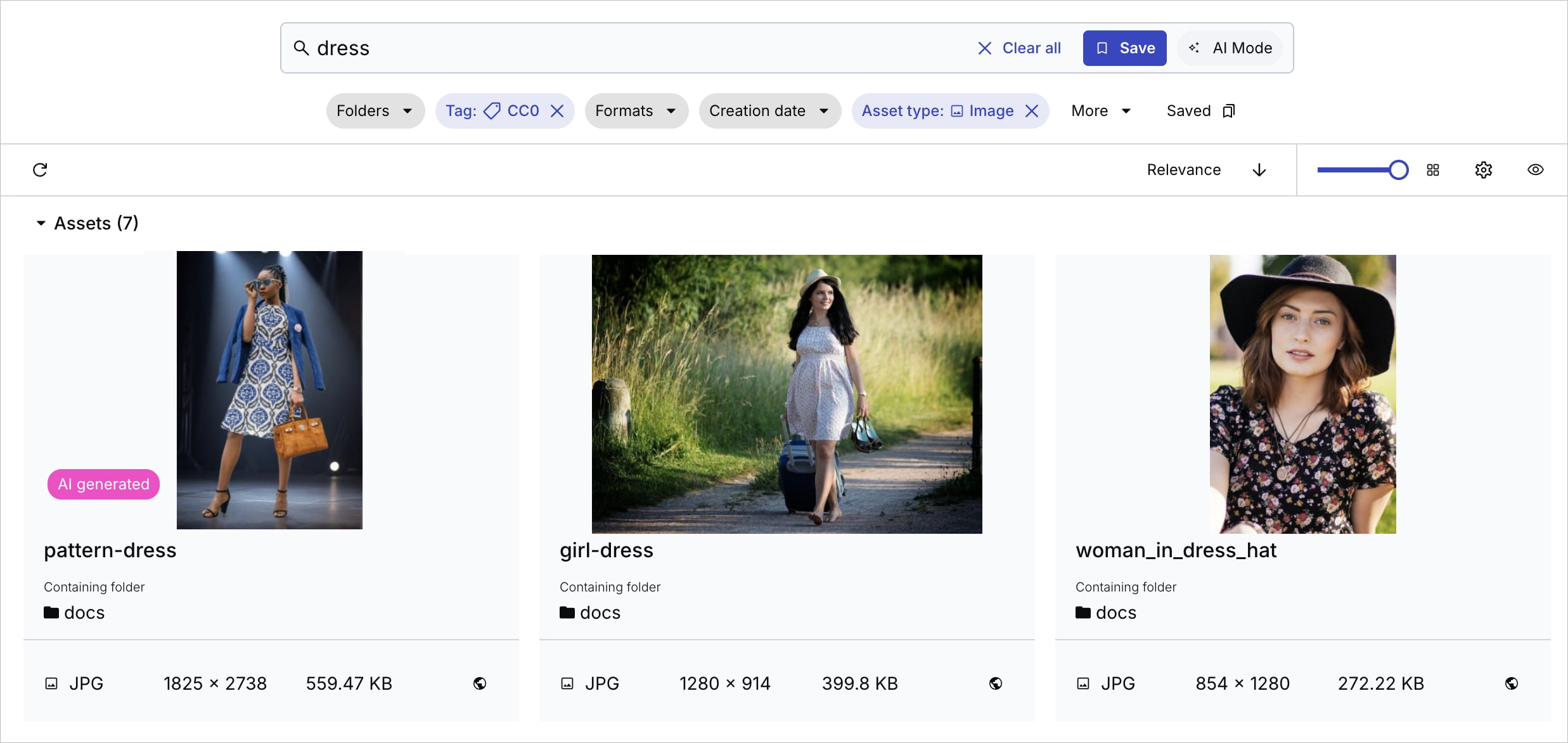
ai_generated=false value. Assets are either marked as AI-generated or not marked at all, so searching for ai_generated=false returns no results. The AI-generated label confirms that an asset has been identified as AI-generated. However, an asset without the label isn't necessarily confirmed to be not AI-generated.Find assets without a C2PA manifest
Use the has_c2pa field to find assets based on whether they have a C2PA manifest. For example, use the following expression to find assets without a C2PA manifest:

For more information, see Query Builder and Advanced Search.
Include provenance fields in Search API responses
To include the ai_generated and has_c2pa fields in a Search API response, add provenance to the with_field parameter. See the sample response.
Disclosing AI-generated content
Regulations such as the EU AI Act require transparency when AI-generated media is published. Article 50 of the EU AI Act sets out two distinct obligations, and meeting them calls for two different mechanisms:
| Audience | Requirement | How Cloudinary helps |
|---|---|---|
| Machine-to-machine | Search engines, scrapers, browsers, and social networks can read and inspect content history programmatically. | Cloudinary signs and adds C2PA assertions containing provenance metadata to the asset. The manifest travels with the asset across CDNs. |
| Machine-to-human | People viewing the media can easily tell when it's AI-generated or AI-altered. | Conditional transformations overlay a visible disclosure on the asset when cld_ai_generated is true, applied at delivery rather than burned into the original. |
Using Cloudinary's C2PA and AI disclosure capabilities doesn't by itself make you compliant with the EU AI Act or any other regulation. Cloudinary provides technical capabilities that support transparency requirements, but you remain responsible for your own legal compliance. Consult your legal or compliance team about which obligations apply to you.
Adding a visible AI disclosure
To disclose AI generation to people viewing your assets, use a conditional transformation that overlays a logo only when the asset's AI-generated field is true. Assets that aren't AI-generated are delivered unchanged, so you can apply the same transformation across your whole library.
The following transformation overlays the image with public ID docs/icons/LABEL_AI_black_transparent, sized to 10% of the asset width, in the bottom-right corner, but only when cld_ai_generated is true:
For example, the following image was uploaded with the ai_generated parameter set to true, so the logo appears in the bottom-right corner:

Because the overlay is applied at delivery, you control its size, placement, and appearance per delivery URL, and you can combine it with any other transformation. For example, cropping to a 9:16 aspect ratio and then adding the disclosure:

t_AIgenlogo, and so that you can change the disclosure's appearance in one place.Verifying a manifest
Anyone can verify the signature and provenance of a delivered asset using standard C2PA verification tools:
- The Content Credentials verification tool shows the chain of manifests in a browser. Pass the delivery URL as the
sourcequery parameter, for example this signed image. - The c2patool command-line tool inspects an image file's manifests in detail.
A verification tool shows each step in the chain in order. For an asset created by a generative AI tool and then transformed by Cloudinary, the chain shows the original AI generation, any edits made in other tools, and the actions Cloudinary performed.
Error
Rate this page:
