 Ask AI
Assets release notes: October 22, 2026
Last updated: Oct-22-2026
We publish Cloudinary Assets (DAM) release notes periodically, providing you a quick overview of all the new features, enhancements, and fixes that have been recently released for Admins and Media Library Users. When relevant, they may also give sneak previews of upcoming features and/or other important announcements.
New features
Describe what you need and let AI agents do the work
Stop clicking through dialog boxes to clean up metadata, build a search query, or create an automation. Describe what you need in plain language and an AI agent does the work using live context from your product environment, with your existing permissions and approvals intact.
- Clean up and apply metadata at scale: Select any number of assets and ask the Taxonomy Agent to update their tags, contextual metadata, or structured metadata in a single request. It can also define a new structured metadata field for you and populate it on those same assets, audit your library for gaps and duplicate values, and plan a cleanup before you commit to it.
- Find assets without building a query: Ask the Search Agent for what you actually want ("approved hero images similar to our beach campaign, tagged for APAC") and get matching assets back, combining metadata, tags, folders, and visual criteria.
- Automate a workflow by describing it: Tell the Workflow Agent what should happen when, and review the MediaFlows automation it drafts before saving it.
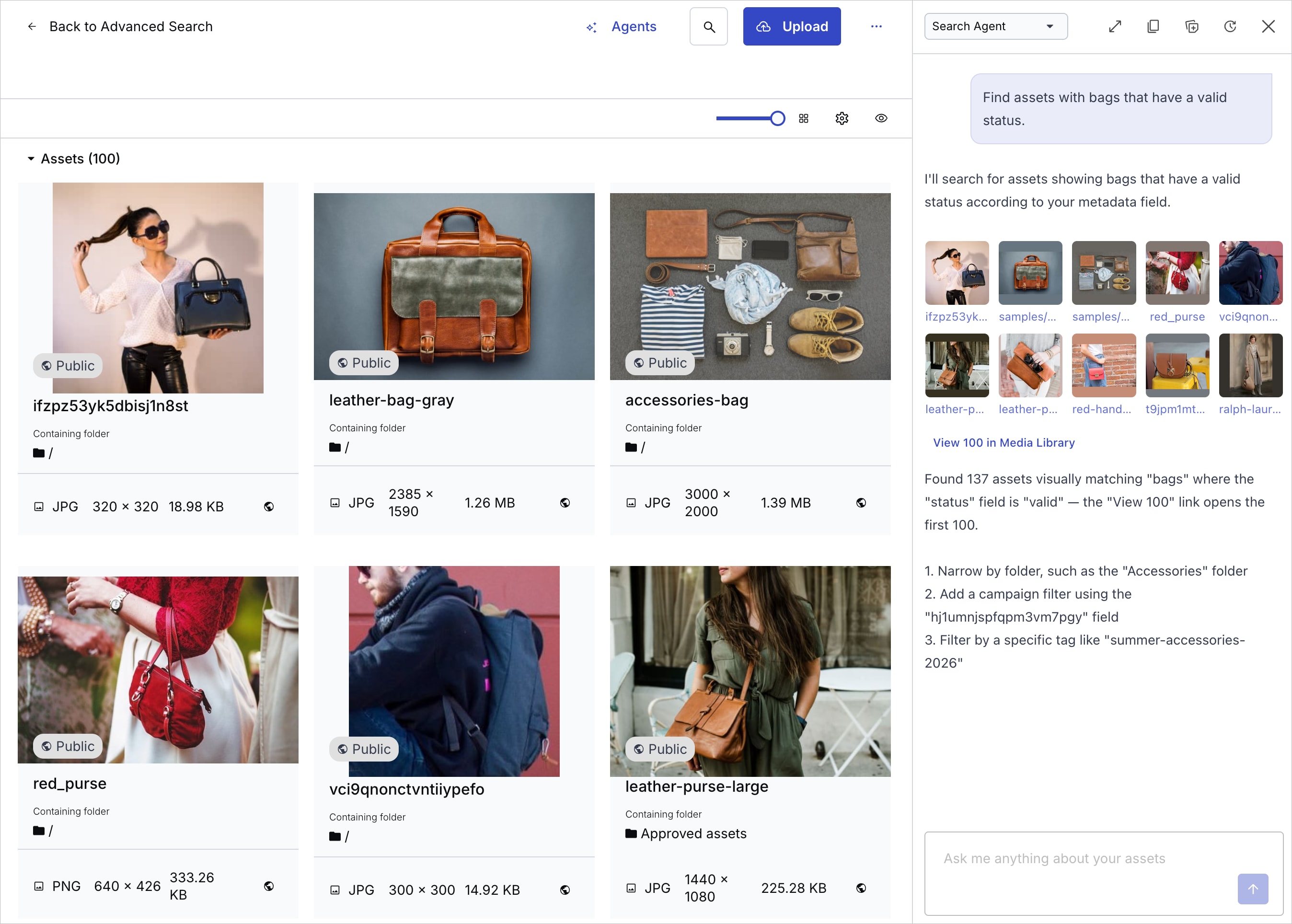
Open Agents from the button in the Assets top bar, from an asset's Manage page or preview pane, or from a bulk selection in the Media Library. Depending on the context, the agent automatically receives the assets you're working with, so you don't have to identify them in your prompt. You can follow the agent's reasoning as it works, and the agent changes nothing until you approve it.
Administrators control whether agents are available, and which ones, from the AI agent settings page of the Console Settings.
Personalize Klaviyo emails with your Cloudinary media
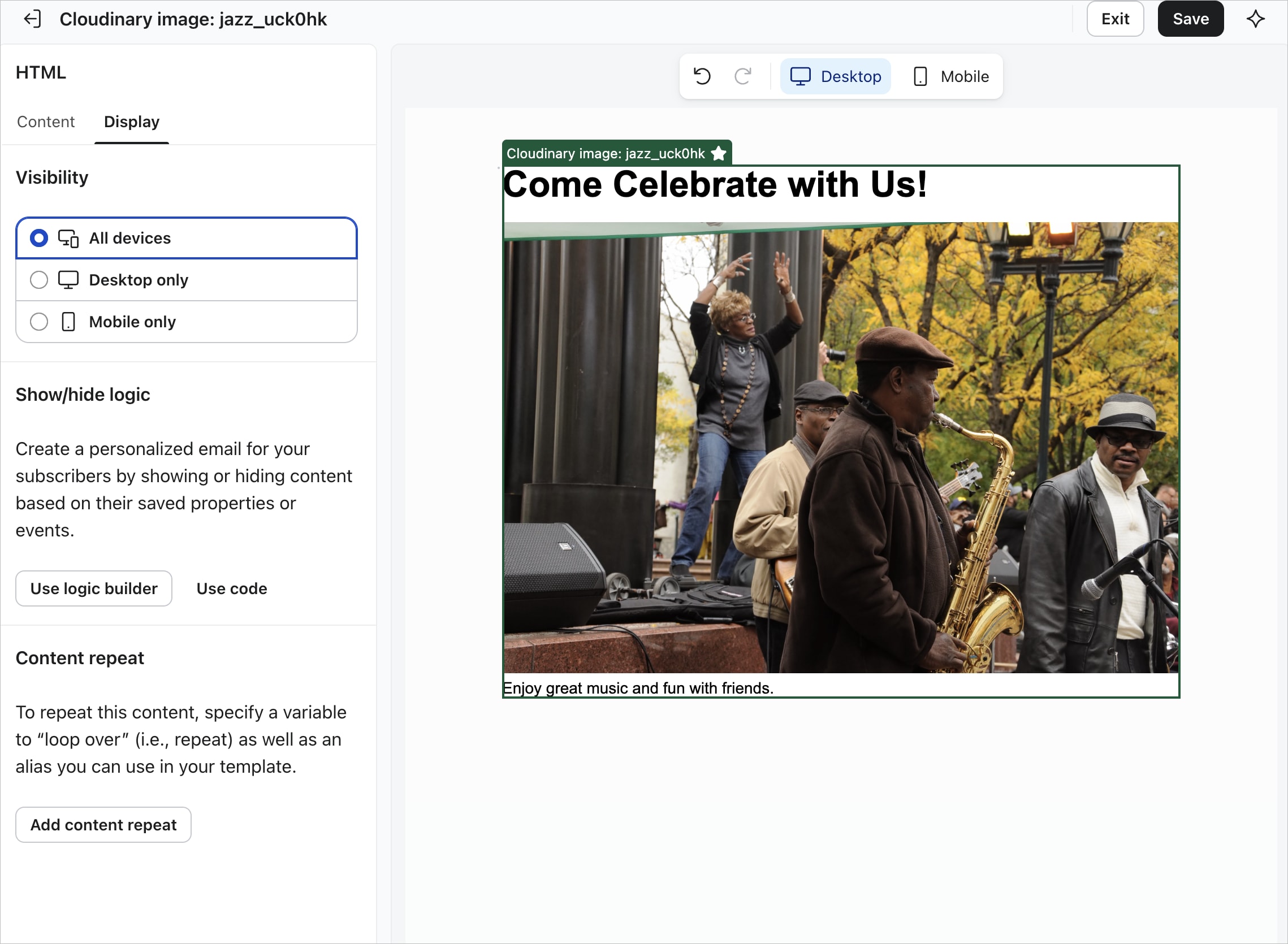
The new Klaviyo Connect App lets you use your Cloudinary images, videos, and dynamic image templates directly in Klaviyo emails. Assets you save to Klaviyo become Universal Content blocks that reference your Cloudinary URLs, so updating an asset in Cloudinary updates every campaign and flow that uses it.
Personalize dynamic images with each recipient's Klaviyo profile and event data, and preview the result for a specific recipient before you send. Recent updates also let you set fallback text for recipients with no matching data, and build coupon links that apply each recipient's own code. See the Klaviyo Connect App release notes for full details.
Enhancements
Control who can open your public collection links
Share collections externally with more confidence: you can now require visitors to verify their email address with a one-time code before a public collection web page opens. Without verification, anyone who has the URL can see and download what's in the collection, so this adds a useful layer of protection for sensitive or pre-release content.
To narrow access further, limit verification to approved email addresses or whole domains, such as name@example.com or example.org. Only visitors on your approved list receive a code, so anyone who isn't on the list can't open the shared collection.
Turn on Require email verification in the Public Link dialog box of any collection to try it out.

Figma plugin: Export with structured metadata and track asset usage
The Cloudinary Figma plugin now fits more closely into your Assets workflows:
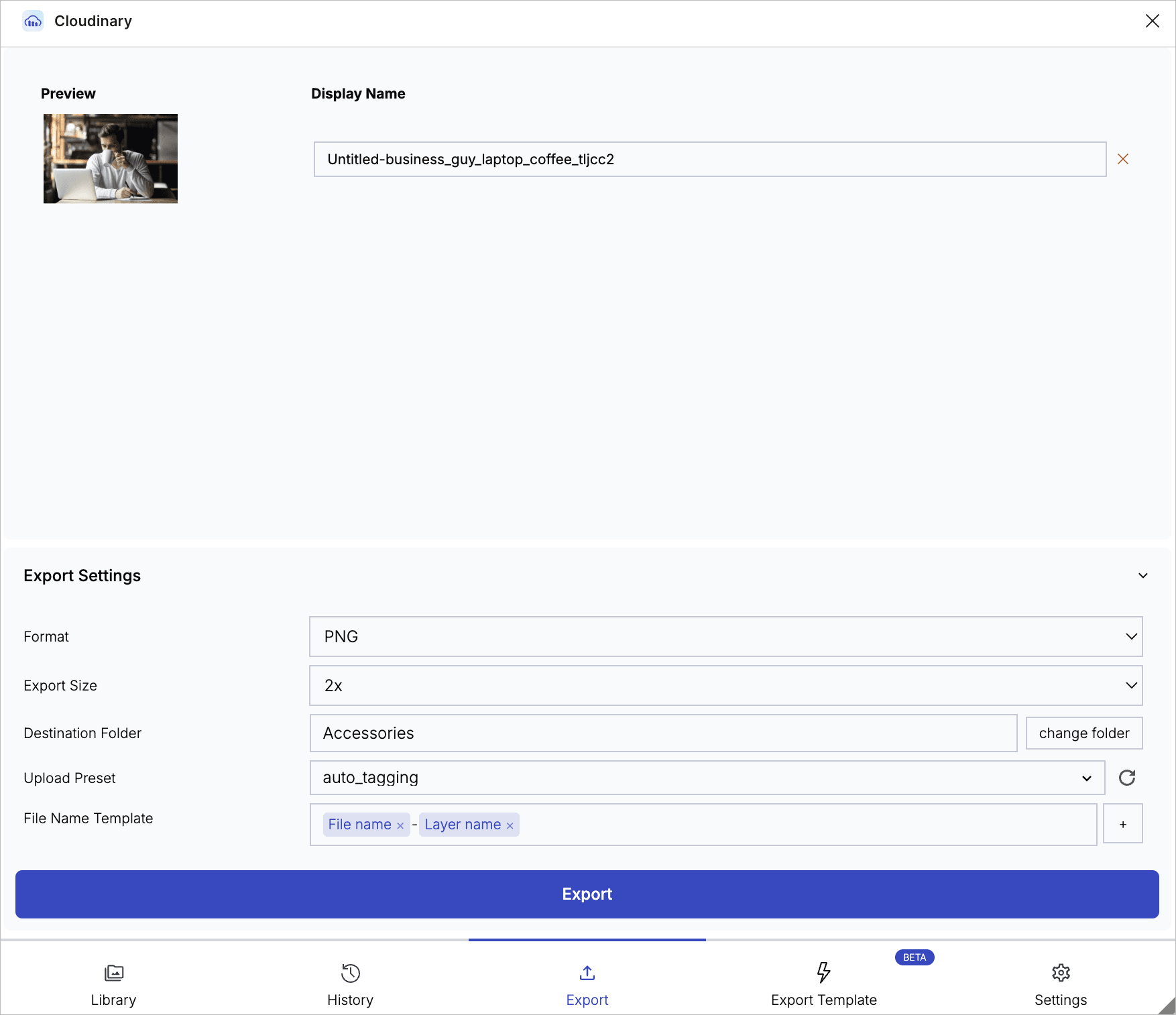
- Upload with structured metadata: Fill in required and optional structured metadata fields when you export assets, with missing or invalid values flagged before you upload.
- Track asset usage: See which Figma documents use each of your Cloudinary assets, connecting your library and your designs in both directions.
- More flexible dynamic images: Dynamic images support more complex Figma designs, named transformations for stable delivery URLs, and 1x, 2x, or 3x export resolution.
The plugin also has a refreshed Info tab, configurable navigation, and an optional lightweight Asset Selector. See the Figma Plugin release notes for full details.
Chrome Extension: Easier template selection and a smoother asset picker
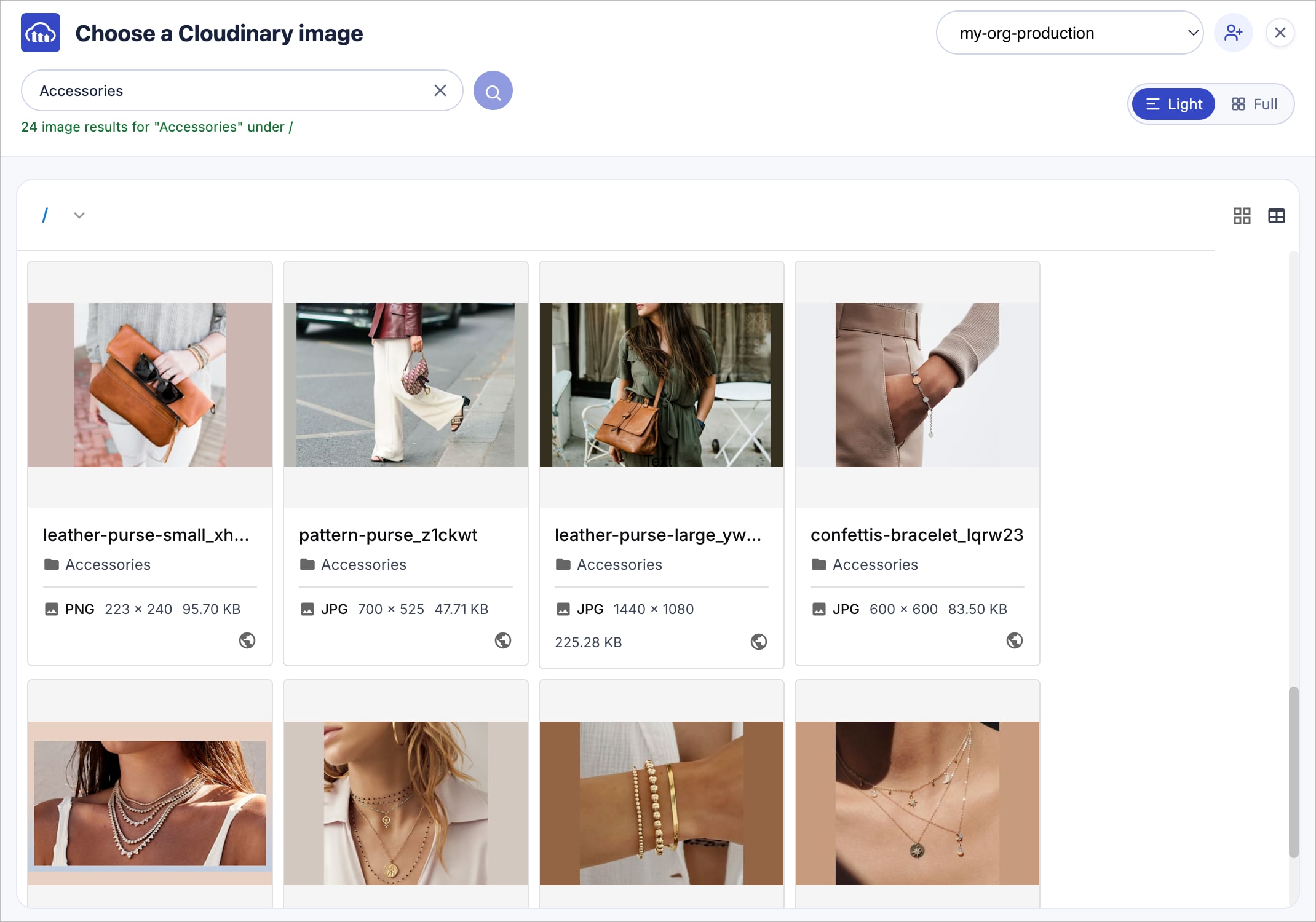
The Cloudinary Chrome Extension (Beta) makes it easier to find the right asset without leaving the page you're working on:
- Dynamic Cloudinary templates in the asset picker now appear as cards showing each template's design, canvas size, and number of variables.
- A new filter bar in the asset picker works the same way as filtering in the Cloudinary Console.
- When you set a field to use Cloudinary, it now stays set when you switch product environments.
- The asset picker opens faster, and scrolling now moves only the asset grid.
See the Chrome Extension release notes for full details, including fixes.
Account management
Users can't gain permissions by adding themselves to groups
Users with user management permissions can no longer add themselves to user groups in the Console. A group's permissions apply to all its members, so joining a group could give a user permissions they don't already have. Any user who wants to be added to a group needs to ask a different user with user management permissions to add them.
Users can still remove themselves from a group, and the root user isn't subject to this restriction.
Track how your asset count grows over time
See how your asset library grows over time with the new Number of Assets chart in the Console's Usage Reports. The line graph shows the overall trend for your product environment at a glance, so you can spot bulk upload spikes and plan for growth. To see the exact asset count for a specific day, hover over that date.

Documentation
Learn how roles control access with a new video tutorial
Understand who can do what in Cloudinary. This short video walks administrators through how roles grant access to users, groups, and API keys, how account, product environment, global, and content roles differ, and how to assign them using access bundles or individual roles.

Register for notifications
Make sure you always know when we publish new release notes with the Assets (DAM) release notes RSS feed:
 Grab this RSS link to watch for new DAM release notes in your favorite RSS reader.
Error
Rate this page:
